
“Connection timed out” tells you the client did not complete a connection in time. It does not tell you whether the server is offline, the address is wrong or traffic is blocked along the route. Work from the simplest checks outward so you do not change a working configuration unnecessarily.
Confirm the process is running and the address is correct, then test from another network. Follow the actual edition and proxy path before changing firewall or DNS settings.
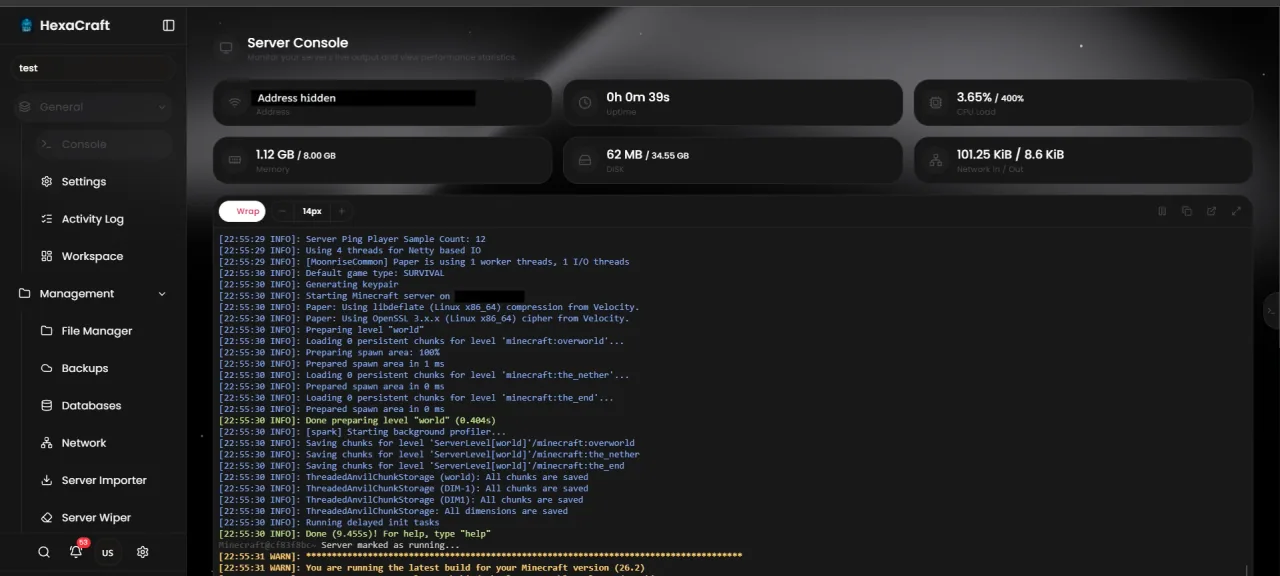
Check the server, not just the panel page
Open the hosting panel and inspect the game startup log. Look for a successful startup or a clear crash, bind failure or missing dependency. A working billing website does not prove the Minecraft process is listening.
If the process has stopped, investigate its log and memory or disk errors first. Repeatedly restarting a crashing service hides the real problem and will not repair a wrong firewall rule.
Copy the exact edition, address and port
Copy the assigned address from the server panel. Java and Bedrock are not interchangeable connection paths. A custom allocation may use a different port from the usual examples; do not replace it with 25565 or 19132 simply because a tutorial does.
For cross-play, confirm the current Geyser listener and transport requirements. When a proxy is used, players should join its public address, not a protected backend address.
Compare networks and names
Ask another player on a different ISP to try. If a hostname fails but the correct assigned IP and port work, investigate its DNS records or cached resolution. If only one network fails, compare its route and local restrictions before changing the server for everybody.
On Windows, a TCP reachability test can be useful for a Java listener. Replace the example hostname and port with your own public service address. It does not test Bedrock UDP gameplay.
Test-NetConnection -ComputerName play.example.com -Port 25565
Check the intended listener and filtering path
On a VPS you manage, confirm that the application is listening on the expected interface and that only the required game traffic is allowed. On shared Minecraft hosting, ask the host to verify the allocation and filtering; do not assume you control the machine firewall.
For a home server, review router forwarding and carrier-grade NAT. For a Velocity network, review proxy-to-backend reachability without opening the backend to every internet address. Ordinary web proxying is not automatically a game proxy.
Escalate with useful evidence
Send support the time and time zone, edition/version, public game address, exact error and a redacted startup log. State whether every player or only one network is affected. Keep account passwords and private connection secrets out of the ticket text.
If joining succeeds but the world remains slow, continue with TPS and MSPT troubleshooting. A timeout and tick lag need different fixes.
Before you finish
- Check successful game startup.
- Use the correct assigned address and edition.
- Compare one other network.
- Report the time, scope and relevant log to support.
Common questions
Does a failed ping prove the Minecraft server is down?
No. ICMP can be filtered while game traffic still works. Test the actual game listener and inspect the process.
Should I disable the firewall?
Keep protection enabled. Verify the specific listener and intended rule, or ask the host to do so.
Official documentation
Commands and configuration depend on your installed software version. Check its current documentation, keep a backup and test one change at a time.
Build a setup that fits your server
Compare monthly allocations and CPU tiers, or use the plan finder for a starting estimate.
Compare Minecraft hosting plans Find a plan