Starter
Starting at
₹40
/month
- 512 MB RAM
- 1 Core
- 50% CPU
- 2 GB NVMe
- Published SLA
Discord bot hosting starts at ₹40/month with 512 MB RAM, a 50% CPU limit and 2 GB NVMe in Mumbai or Noida; the same plans also offer Miami and Ashburn.

Pricing
Choose the plan that fits your Discord bot.
Starting at
Starting at
Starting at
Starting at
Starting at
Starting at
Features
Everything you need to run Discord bots at scale.
Compare the CPU allocation, memory and NVMe storage on each card. CPU percentages describe an allocation, not a count of dedicated physical cores.
The Starter plan has 512 MB RAM. Include your runtime, dependencies, database and logs when checking whether a plan fits.
The same Starter-to-Ultimate plans are available in Mumbai and Noida, India, plus Miami and Ashburn, USA. Confirm the selected city and stock before ordering.
Check the runtime version, startup command and native dependencies your application needs with support before transferring it.
Use the hosting panel to manage your bot application. For a complete Linux operating system with root access, compare our Cloud VPS service.
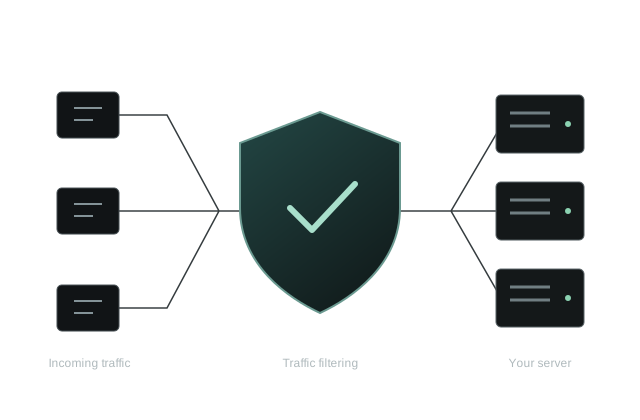
DDoS protection is advertised with these plans. Confirm the coverage for your selected service; protection does not guarantee uninterrupted application availability.
Test from the networks your users use. A server city or advertised uplink does not establish Discord API response time.
Choose from Starter, Pro Plan, Ultra, Elite, Diamond and Ultimate. Prices are listed in INR per month.
Contact the billing support team for account or service questions, or join the Discord community. Read the refund terms and SLA before ordering.
STANDARD BOT LOCATIONS
The same Starter-to-Ultimate plans are also available in Miami and Ashburn, USA. Confirm the selected city for your order.
Need an India-located server with Linux root access? Compare Cloud VPS in Noida and Mumbai, a different product with different allocations and prices.
CHOOSE BY WORKLOAD
Compare monthly price and resources below. The same plans are offered in Mumbai and Noida, India, plus Miami and Ashburn, USA. Confirm stock in your chosen city before paying.
| Plan | RAM | CPU allocation | Storage | Monthly price | Monthly unit price |
|---|---|---|---|---|---|
| Starter | 512 MB RAM | 50% CPU | 2 GB NVMe | ₹40/month | ₹80/GB RAM/month |
| Pro Plan | 1024 MB RAM | 100% CPU | 6 GB NVMe | ₹84/month | ₹84/GB RAM/month |
| Ultra | 4096 MB RAM | 150% CPU | 12 GB NVMe | ₹253/month | ₹63.25/GB RAM/month |
| Elite | 8096 MB RAM | 400% CPU | 18 GB NVMe | ₹347/month | ₹43.89/GB RAM/month |
| Diamond | 12 GB RAM | 500% CPU | 25 GB NVMe | ₹562/month | ₹46.83/GB RAM/month |
| Ultimate | 16 GB RAM | 800% CPU | 32 GB NVMe | ₹894/month | ₹55.88/GB RAM/month |
Check your runtime version and dependency file before choosing a plan. Leave memory for libraries, a database and workload spikes. A 512 MB allocation is not suitable for every bot.
Keep an independent copy of your source and configuration. Store the bot token privately; do not put it in a public repository, screenshot or support message. Rotate it if it is exposed.
For a bot application, compare the plans above. For an India-located Linux server you configure yourself, choose India VPS plans. A music relay has different requirements: see Lavalink hosting.
Locations, resources, software and service terms.
Check the bot’s required runtime version, dependencies, startup command, normal memory use and storage before ordering. HexaCraft’s affordable Discord bot hosting starts at ₹40/month with 512 MB RAM, a 50% CPU limit and 2 GB NVMe. The same standard plans offer Mumbai, Noida, Miami and Ashburn; confirm the selected city and compatible runtime image with support. Keep tokens private and use the Discord bot hosting and deployment guide to prepare the move.
The standard Starter-to-Ultimate bot plans are hosted in Mumbai and Noida, India, plus Miami and Ashburn, USA. The same plans are offered in all four locations. Confirm the selected city and stock for your order.
Starter costs ₹40/month with 512 MB RAM, a listed 1 Core allocation, a 50% CPU limit and 2 GB NVMe storage. It is the lowest-priced plan in this HexaCraft bot catalog; it is not a claim to be the cheapest provider in the whole market.
Match the runtime and version to your bot’s dependency file and startup command. Confirm the available runtime image and any native libraries with support; do not assume every version or language is pre-installed.
Choose bot hosting for a bot application managed through the hosting panel. Choose Cloud VPS hosting in India if you need a Linux operating system with root access to configure services yourself. For a separate music relay, compare dedicated Lavalink hosting.
Check memory use after dependencies load, then under your normal command workload. Review the application logs for errors and the panel for resource limits. Keep the bot token private and back up your code and configuration before transferring a working bot.
The 24-hour refund policy applies to all HexaCraft services, including bot hosting. The window starts at deployment; eligibility conditions and applicable deductions are explained in the refund policy. Availability targets, exclusions and service-credit conditions are described in the SLA; a target is not a promise of zero downtime.
Cashfree supports UPI, cards, net banking and wallets. Review the gateway options shown for your actual order.
No free tier or trial is promised for these paid bot plans. The published standard catalog starts at ₹40/month.
The hosted application can run independently of your PC. It still needs working code, valid Discord credentials and a compatible runtime. Availability is subject to the published SLA, not a zero-downtime guarantee.
Use billing support, the HexaCraft Discord community or WhatsApp at +91 96046 63733. Do not send bot tokens or passwords in public messages.
Explore more hosting options from HexaCraft.
Community support & bot setup guides
A CLEARER WAY TO CHOOSE
Deploy and maintain a Discord bot for your community · Published hosting facts
For Discord community applications that fit the selected allocation and available runtime image. We list no guaranteed runtime language or version until compatibility is confirmed for the project.
Check the dependency file, runtime version, startup command and normal memory use before ordering. Leave space for packages, logs and application data; a 512 MB entry plan will not fit every bot.
The same six standard bot plans are available in Mumbai and Noida, India, plus Miami and Ashburn, USA. Confirm the selected city and stock before ordering.
Mumbai and Noida network tests ↗Cashfree supports UPI, cards, net banking and wallets. The 24-hour refund policy applies from deployment, subject to eligibility and applicable deductions.
Use billing support, Discord or WhatsApp. Discord and WhatsApp support are available 24/7, without a guaranteed response time.
Unit prices are arithmetic comparisons, rounded to two decimals, not performance measurements. 1 GB = 1024 MB; Elite bot RAM remains the published 8096 MB. CPU percentages and vCores are allocations, not dedicated physical-core guarantees.
Starter at ₹40/month lists 512 MB RAM, a 50% CPU limit and 2 GB NVMe. Pro at ₹84/month raises those to 1,024 MB, 100% CPU and 6 GB NVMe. Ultra at ₹253/month lists 4,096 MB RAM and 12 GB NVMe. Measure startup memory and busy commands before choosing from the six Discord bot plans.
Send support the runtime and version, dependency file, start command and any database or external audio requirements. Ask about any native packages or binaries the bot needs. This gives support enough detail to confirm whether the panel environment fits or whether you need a Linux VPS to manage the full software stack.
Run the bot on the host and test it in a private Discord server first. Store the token in the environment and test the commands and permissions your community needs. Confirm current stock in Mumbai or Noida. The guide to hosting a Discord bot 24/7 in India walks through deployment and restart checks.
Your cart is empty